



 智算多多
智算多多联系我们


关注我们

公众号

视频号
隐私协议用户协议
◎ 2025 北京智算多多科技有限公司版权所有京ICP备 2025150592号-1
| 类别 | 内容 |
|---|---|
| 系统名称 | 无人机视角垃圾智能检测系统 |
| 核心算法 | YOLOv11n (Ultralytics) |
| 检测任务 | 无人机航拍图像中的垃圾目标检测与定位 |
| 数据集规模 | 图像总数:26,700+ 张 标注总数:40,000+ 个 数据总量:约 3.5 GB |
| 数据格式 | 标准 YOLO 格式 (.txt 标注文件) |
| 应用场景 | 城市环卫快速巡检、垃圾堆积点快速定位、环境监测 |
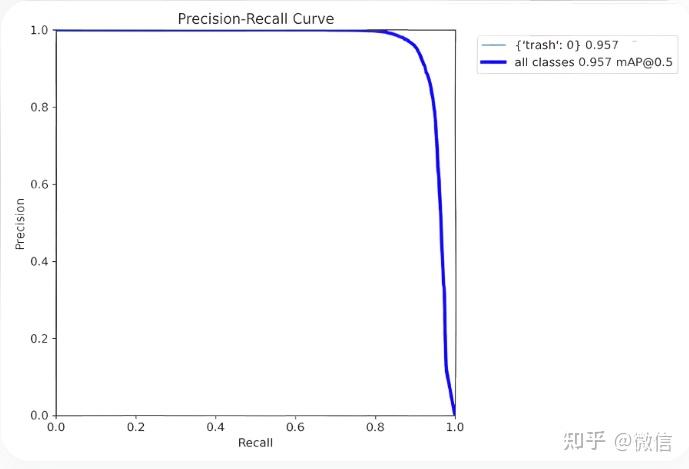
| 模型性能 | 训练轮次 (Epochs): 50 mAP: 详见项目描述图 |
| 用户界面 | 基于 PyQt5 开发的图形化界面 |
| 系统功能 |
|
无人机视角垃圾检测数据集,26700余张无人机图像,超过4万标注信息,yolo标注格式,共3.5GB数据量,可用于环卫快速检查,垃圾快速定位等应用
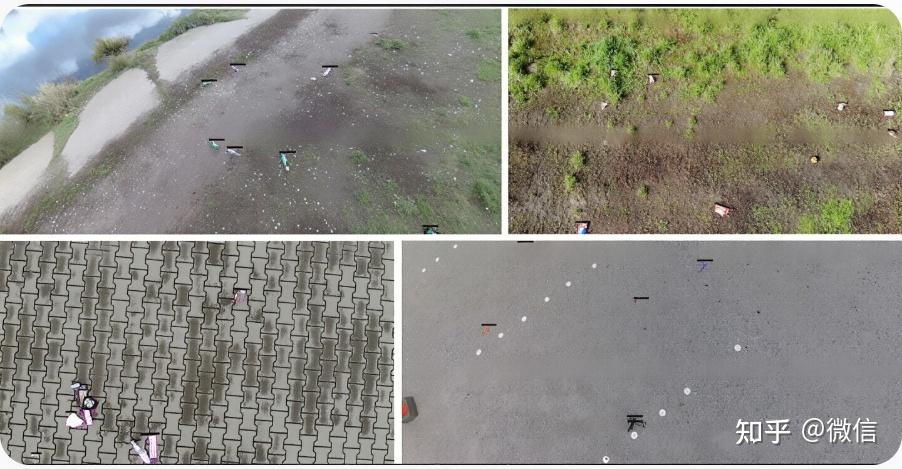
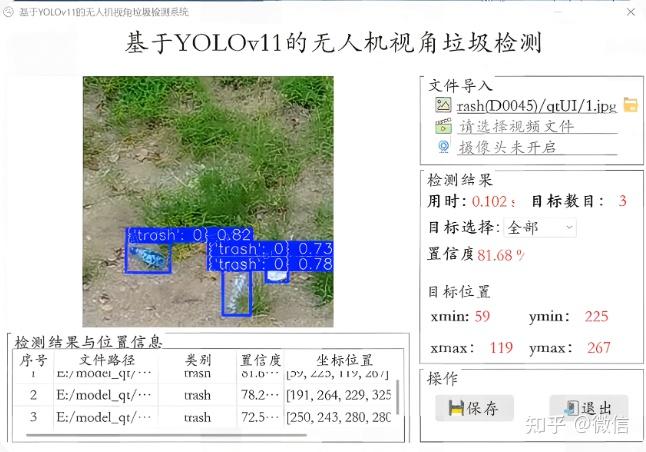
模型代码:模型训练使用yolov11n训练,50个epoch训练结果,map如描述图所示。 qt界面:运行界面采用pyqt编写,本项目已经训练好模型,配置好环境后可直接使用,运行效果见描述图像
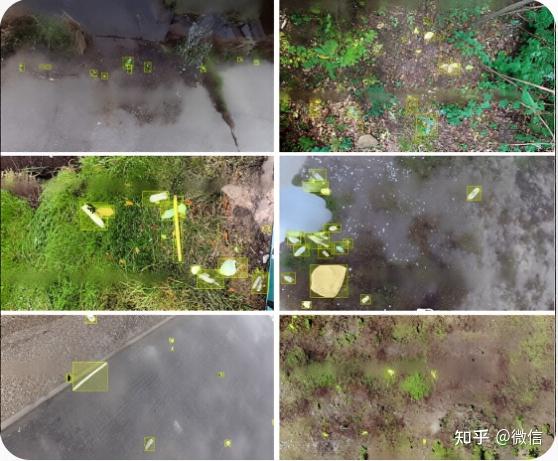
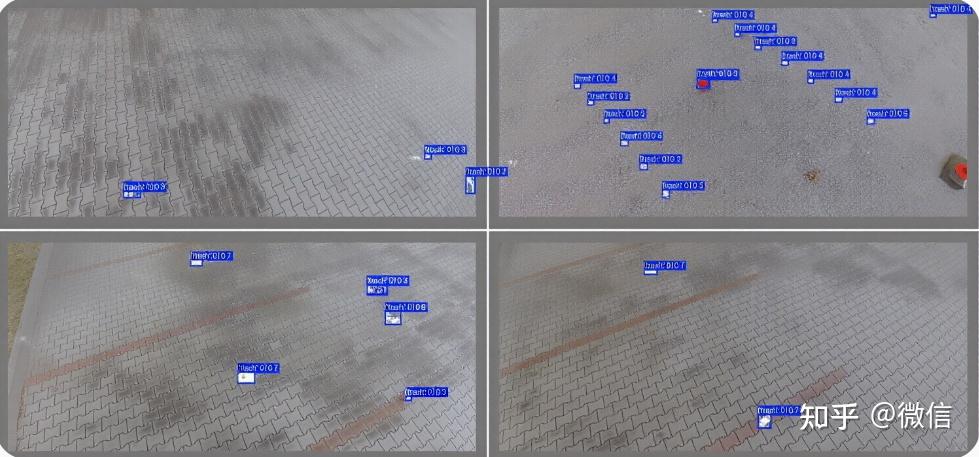
以下是构建该系统的完整代码,分为三部分:数据配置文件、模型训练代码和PyQt5界面代码。
data.yaml)同学,数据集实际路径修改此文件。
# data.yaml

# 数据集根目录 (请修改为您的实际路径)
path: /path/to/your/drone_garbage_dataset

# 训练集和验证集图片路径 (相对于 path)
train: images/train
val: images/val

# 类别数量 (根据您的数据集实际情况修改,此处以2类为例)
nc: 2

# 类别名称 (请确保与您的标注文件中的索引顺序一致)
names:
  0: bottle  # 例如:瓶子
  1: bag     # 例如:塑料袋
train.py)此脚本用于训练YOLOv11n模型。
from ultralytics import YOLO

def train_drone_garbage_model():
    """
    使用 YOLOv11n 训练无人机垃圾检测模型
    """
    # 1. 加载预训练模型
    model = YOLO('yolov11n.pt')  # 加载轻量级的 YOLOv11n 预训练权重

    # 2. 开始训练
    results = model.train(
        data='data.yaml',            # 数据配置文件路径
        epochs=50,                   # 训练轮数
        imgsz=640,                   # 输入图像尺寸
        batch=16,                    # 批大小,根据GPU显存调整
        name='drone_garbage_v11n',   # 训练任务名称
        project='runs/train',        # 项目保存目录
        exist_ok=True,               # 允许覆盖已有实验
        patience=10,                 # 早停耐心值,防止过拟合
        device=0,                    # 使用GPU 0,若使用CPU则设为 'cpu'
        workers=4                    # 数据加载线程数
    )

    print("训练完成!")
    print(f"最佳模型保存在: {results.save_dir}/weights/best.pt")

if __name__ == "__main__":
    train_drone_garbage_model()
main_window.py)此代码创建了图形用户界面,实现了图像/视频检测、实时流检测和结果展示功能。
import sys
import time
import cv2
from PyQt5.QtWidgets import (QApplication, QMainWindow, QWidget, QVBoxLayout,
                             QHBoxLayout, QLabel, QPushButton, QFileDialog,
                             QTableWidget, QTableWidgetItem, QMessageBox)
from PyQt5.QtGui import QPixmap, QImage, QFont
from PyQt5.QtCore import Qt, QTimer, QThread, pyqtSignal
from ultralytics import YOLO

# --- 检测线程 ---
class DetectionThread(QThread):
    # 信号用于更新UI
    frame_processed = pyqtSignal(QImage, list, float)
    finished = pyqtSignal()

    def __init__(self, model, source=0):
        super().__init__()
        self.model = model
        self.source = source  # 0 for webcam, or file path
        self.running = True

    def run(self):
        cap = cv2.VideoCapture(self.source)
        while self.running and cap.isOpened():
            ret, frame = cap.read()
            if not ret:
                break

            start_time = time.time()
            # 进行推理
            results = self.model(frame)
            infer_time = time.time() - start_time

            # 解析结果
            detections = []
            annotated_frame = results[0].plot()  # 获取带标注的帧
            for box in results[0].boxes:
                cls_id = int(box.cls[0])
                conf = float(box.conf[0])
                xyxy = box.xyxy[0].tolist()
                detections.append({
                    'class': self.model.names[cls_id],
                    'confidence': conf,
                    'coordinates': xyxy
                })

            # 转换颜色格式 (BGR -> RGB)
            rgb_image = cv2.cvtColor(annotated_frame, cv2.COLOR_BGR2RGB)
            h, w, ch = rgb_image.shape
            bytes_per_line = ch * w
            qt_image = QImage(rgb_image.data, w, h, bytes_per_line, QImage.Format_RGB888)

            # 发送信号
            self.frame_processed.emit(qt_image, detections, infer_time)

        cap.release()
        self.finished.emit()

    def stop(self):
        self.running = False
        self.wait()

# --- 主窗口 ---
class MainWindow(QMainWindow):
    def __init__(self):
        super().__init__()
        self.setWindowTitle("无人机视角垃圾检测系统")
        self.setGeometry(100, 100, 1200, 800)

        # 加载模型 (请确保路径正确)
        self.model = YOLO('runs/train/drone_garbage_v11n/weights/best.pt')

        self.init_ui()
        self.detection_thread = None

    def init_ui(self):
        # --- 主布局 ---
        central_widget = QWidget()
        self.setCentralWidget(central_widget)
        main_layout = QHBoxLayout(central_widget)

        # --- 左侧:图像显示区域 ---
        left_layout = QVBoxLayout()
        self.image_label = QLabel("等待输入...")
        self.image_label.setAlignment(Qt.AlignCenter)
        self.image_label.setMinimumSize(640, 480)
        self.image_label.setStyleSheet("QLabel { background-color : lightgray; }")
        left_layout.addWidget(self.image_label)

        # --- 右侧:控制面板 ---
        right_layout = QVBoxLayout()

        # 文件导入
        file_group = QLabel("文件导入")
        file_group.setFont(QFont("Arial", 12, QFont.Bold))
        right_layout.addWidget(file_group)

        self.btn_select_image = QPushButton("选择图片文件")
        self.btn_select_image.clicked.connect(self.select_image)
        right_layout.addWidget(self.btn_select_image)

        self.btn_select_video = QPushButton("选择视频文件")
        self.btn_select_video.clicked.connect(self.select_video)
        right_layout.addWidget(self.btn_select_video)

        self.btn_webcam = QPushButton("开启摄像头/图传")
        self.btn_webcam.clicked.connect(self.toggle_webcam)
        right_layout.addWidget(self.btn_webcam)

        # 检测结果
        result_group = QLabel("检测结果")
        result_group.setFont(QFont("Arial", 12, QFont.Bold))
        right_layout.addWidget(result_group)

        self.time_label = QLabel("用时: 0.000s")
        self.count_label = QLabel("目标数目: 0")
        self.conf_label = QLabel("置信度: 0.00%")

        right_layout.addWidget(self.time_label)
        right_layout.addWidget(self.count_label)
        right_layout.addWidget(self.conf_label)

        # 操作按钮
        action_group = QLabel("操作")
        action_group.setFont(QFont("Arial", 12, QFont.Bold))
        right_layout.addWidget(action_group)

        self.btn_exit = QPushButton("退出")
        self.btn_exit.clicked.connect(self.close)
        right_layout.addWidget(self.btn_exit)

        # --- 底部:检测结果表格 ---
        self.table = QTableWidget()
        self.table.setColumnCount(4)
        self.table.setHorizontalHeaderLabels(["序号", "类别", "置信度", "坐标位置"])
        main_layout.addLayout(left_layout, 70)
        main_layout.addLayout(right_layout, 30)
        main_layout.addWidget(self.table)

    def select_image(self):
        file_path, _ = QFileDialog.getOpenFileName(self, "选择图片文件", "", "Image Files (*.png *.jpg *.jpeg)")
        if file_path:
            self.detect_single_image(file_path)

    def select_video(self):
        file_path, _ = QFileDialog.getOpenFileName(self, "选择视频文件", "", "Video Files (*.mp4 *.avi *.mov)")
        if file_path:
            self.start_detection(file_path)

    def toggle_webcam(self):
        if self.detection_thread and self.detection_thread.isRunning():
            self.detection_thread.stop()
            self.btn_webcam.setText("开启摄像头/图传")
        else:
            self.start_detection(0) # 0 代表默认摄像头
            self.btn_webcam.setText("关闭摄像头/图传")

    def detect_single_image(self, img_path):
        if self.detection_thread and self.detection_thread.isRunning():
            self.detection_thread.stop()

        frame = cv2.imread(img_path)
        if frame is None:
            QMessageBox.warning(self, "错误", "无法读取图片文件")
            return

        start_time = time.time()
        results = self.model(frame)
        infer_time = time.time() - start_time

        detections = []
        annotated_frame = results[0].plot()
        for box in results[0].boxes:
            cls_id = int(box.cls[0])
            conf = float(box.conf[0])
            xyxy = box.xyxy[0].tolist()
            detections.append({
                'class': self.model.names[cls_id],
                'confidence': conf,
                'coordinates': xyxy
            })

        # 更新UI
        rgb_image = cv2.cvtColor(annotated_frame, cv2.COLOR_BGR2RGB)
        h, w, ch = rgb_image.shape
        bytes_per_line = ch * w
        qt_image = QImage(rgb_image.data, w, h, bytes_per_line, QImage.Format_RGB888)
        pixmap = QPixmap.fromImage(qt_image)
        self.image_label.setPixmap(pixmap.scaled(self.image_label.size(), Qt.KeepAspectRatio))

        self.time_label.setText(f"用时: {infer_time:.3f}s")
        self.count_label.setText(f"目标数目: {len(detections)}")
        if detections:
            avg_conf = sum(d['confidence'] for d in detections) / len(detections)
            self.conf_label.setText(f"置信度: {avg_conf:.2%}")
        else:
            self.conf_label.setText("置信度: 0.00%")

        # 更新表格
        self.table.setRowCount(len(detections))
        for i, det in enumerate(detections):
            self.table.setItem(i, 0, QTableWidgetItem(str(i + 1)))
            self.table.setItem(i, 1, QTableWidgetItem(det['class']))
            self.table.setItem(i, 2, QTableWidgetItem(f"{det['confidence']:.2%}"))
            coords = [int(x) for x in det['coordinates']]
            self.table.setItem(i, 3, QTableWidgetItem(str(coords)))

    def start_detection(self, source):
        if self.detection_thread and self.detection_thread.isRunning():
            self.detection_thread.stop()

        self.detection_thread = DetectionThread(self.model, source)
        self.detection_thread.frame_processed.connect(self.update_frame)
        self.detection_thread.finished.connect(self.on_detection_finished)
        self.detection_thread.start()

    def update_frame(self, qt_image, detections, infer_time):
        # 更新图像
        pixmap = QPixmap.fromImage(qt_image)
        self.image_label.setPixmap(pixmap.scaled(self.image_label.size(), Qt.KeepAspectRatio))

        # 更新检测结果
        self.time_label.setText(f"用时: {infer_time:.3f}s")
        self.count_label.setText(f"目标数目: {len(detections)}")
        if detections:
            avg_conf = sum(d['confidence'] for d in detections) / len(detections)
            self.conf_label.setText(f"置信度: {avg_conf:.2%}")
        else:
            self.conf_label.setText("置信度: 0.00%")

        # 更新表格
        self.table.setRowCount(len(detections))
        for i, det in enumerate(detections):
            self.table.setItem(i, 0, QTableWidgetItem(str(i + 1)))
            self.table.setItem(i, 1, QTableWidgetItem(det['class']))
            self.table.setItem(i, 2, QTableWidgetItem(f"{det['confidence']:.2%}"))
            coords = [int(x) for x in det['coordinates']]
            self.table.setItem(i, 3, QTableWidgetItem(str(coords)))

    def on_detection_finished(self):
        self.btn_webcam.setText("开启摄像头/图传")
        QMessageBox.information(self, "提示", "视频播放完毕或摄像头已停止。")

    def closeEvent(self, event):
        if self.detection_thread and self.detection_thread.isRunning():
            self.detection_thread.stop()
        event.accept()

if __name__ == "__main__":
    app = QApplication(sys.argv)
    window = MainWindow()
    window.show()
    sys.exit(app.exec_())
data.yaml 文件。train.py 脚本。runs/train/drone_garbage_v11n/weights/best.pt。main_window.py 中的模型路径 self.model = YOLO('...') 指向您训练好的 best.pt 文件。main_window.py 即可启动图形界面。智算多多