



 智算多多
智算多多联系我们

官方邮箱:service@zsdodo.com

公司地址:北京市丰台区南四环西路188号总部基地三区国联股份数字经济总部
关注我们

公众号

视频号
◎2025 北京智算多多科技有限公司版权所有 京ICP备 2025150592号-1  京公网安备11010602202532号
京公网安备11010602202532号 Dynamic workflows execute a JavaScript file containing special functions that help generate and coordinate sub - Agents.
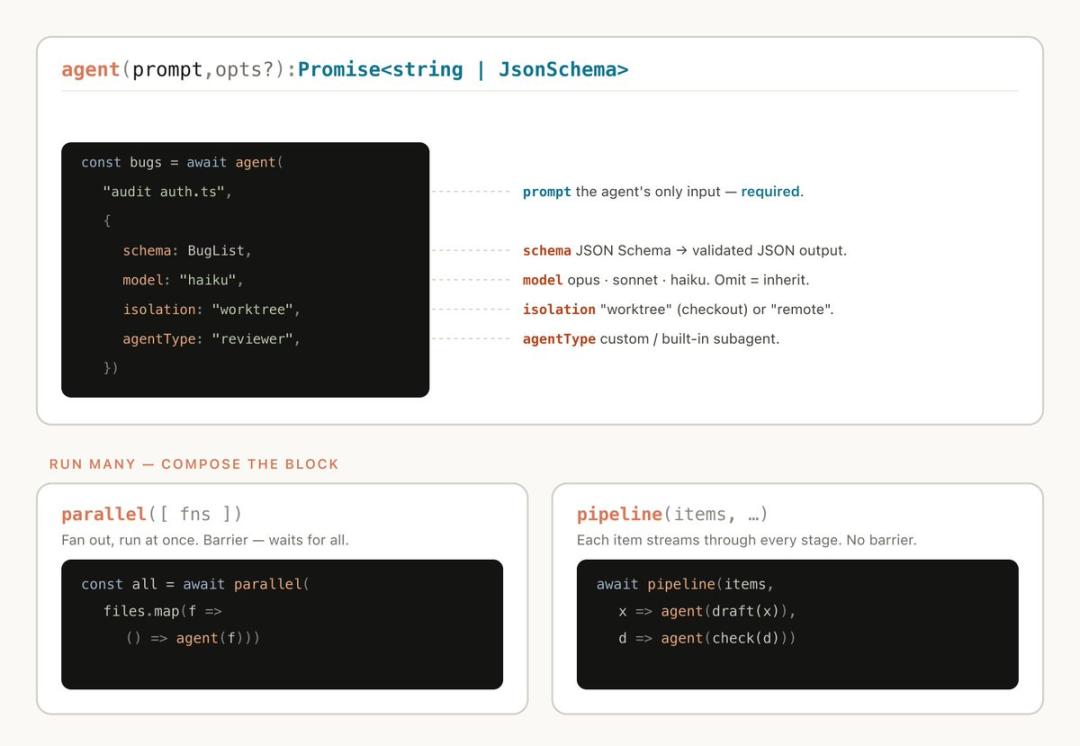
Meanwhile, dynamic workflows also include standard JavaScript features such as JSON, Math, and Array for data processing.
Dynamic workflows can determine the type of model an Agent uses and whether sub - Agents run in independent work trees, allowing Claude to select the required level of intelligence and isolation method.
If the workflow is interrupted, for example, by user operations or terminal exit, when resuming the session, the workflow can continue execution from the breakpoint.
When we use the default Claude Code framework to execute tasks, it needs to plan and execute simultaneously in the same context window. For many programming tasks, this is very effective, but in long - running, large - scale parallel, or highly structured adversarial tasks, problems may sometimes occur.
The reason is that the longer Claude processes complex tasks in a single context window, the more likely it is to experience the following types of failure modes:
Creating workflows can avoid these problems by assigning independent context windows to Claude instances for different goals, with each instance focusing on and isolating the task goal.
You may have previously created static workflows using the Claude Agent SDK or claude - p to coordinate multiple Claude Code instances.
Static workflows need to account for all extreme cases, so they are usually more general. With the dynamic workflows of Claude Opus 4.8, Claude can now generate intelligent frameworks customized for your specific use cases.
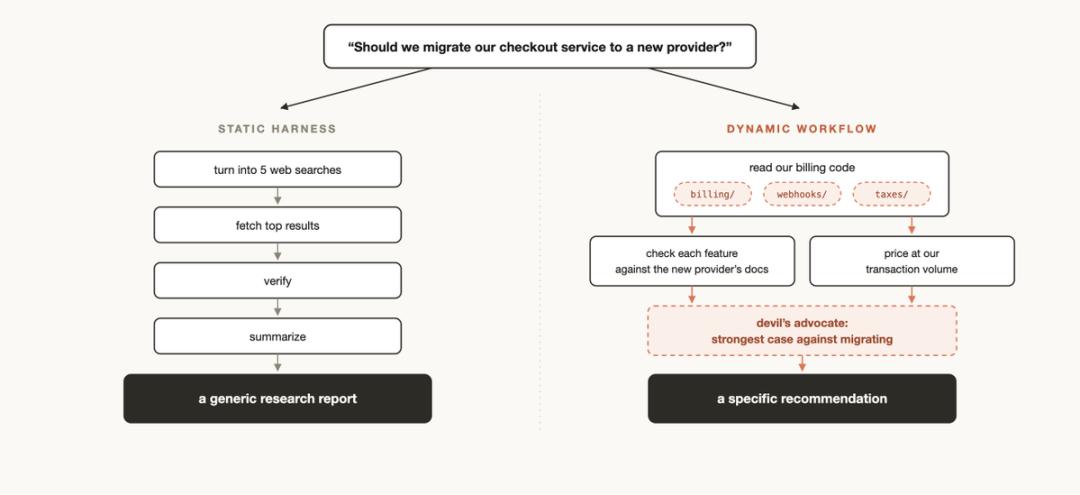
You can directly ask Claude to generate a dynamic workflow, or use the trigger word “ultracode” to ensure that Claude Code creates a workflow.
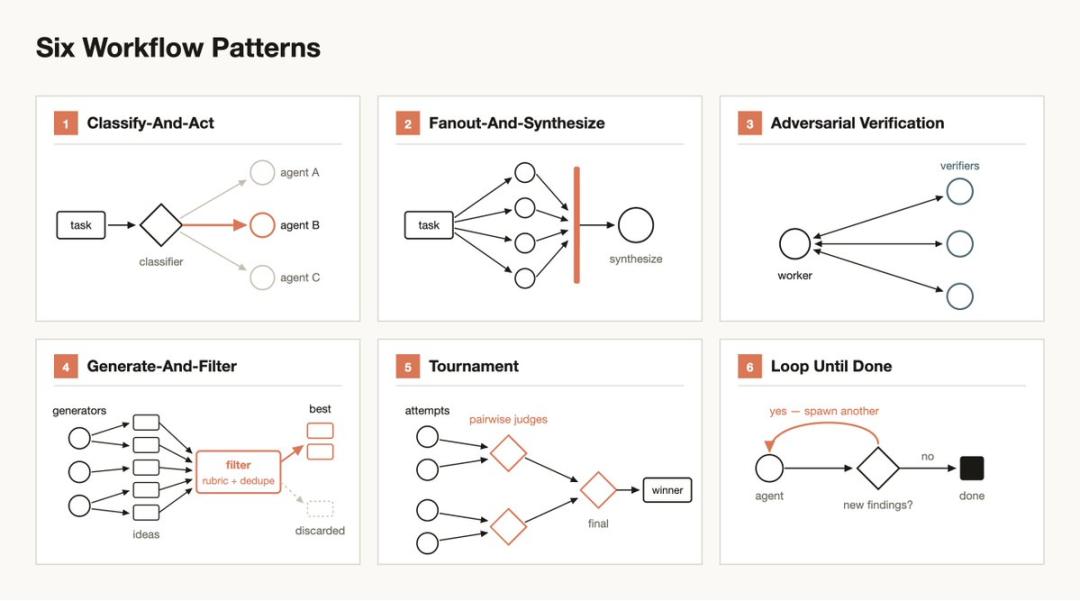
Understanding the common patterns of dynamic workflows helps to determine when to use them and how to guide Claude through prompts:
The rewrite of Bun from Zig to Rust was completed using workflows.
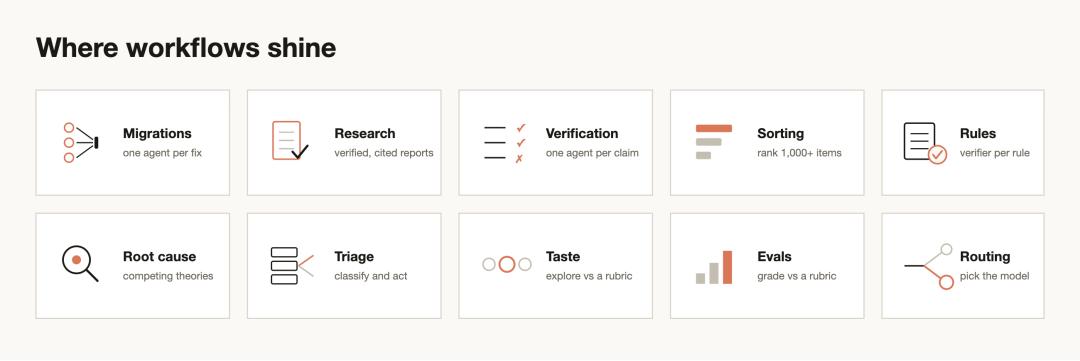
The key is to break the task into a series of small units that can be processed step by step, such as call points, failed tests, modules, etc. Each fix is assigned to a sub - Agent in an independent worktree; then another Agent conducts an adversarial review, and the changes are merged after confirmation.
If you want to run tasks in parallel as much as possible without overloading local resources, you can explicitly tell the Agent not to run commands that consume a lot of resources.
We released an in - depth research skill (/deep - research) in Claude Code, which uses dynamic workflows.
Specifically, it conducts parallel web searches, fetches data sources, conducts adversarial verification of the statements, and finally integrates them into a research report with references.
However, this type of research is not limited to web searches. For example, you can also ask Claude to compile a status report from the Slack context or let it browse the codebase in - depth to study how a certain function is implemented.
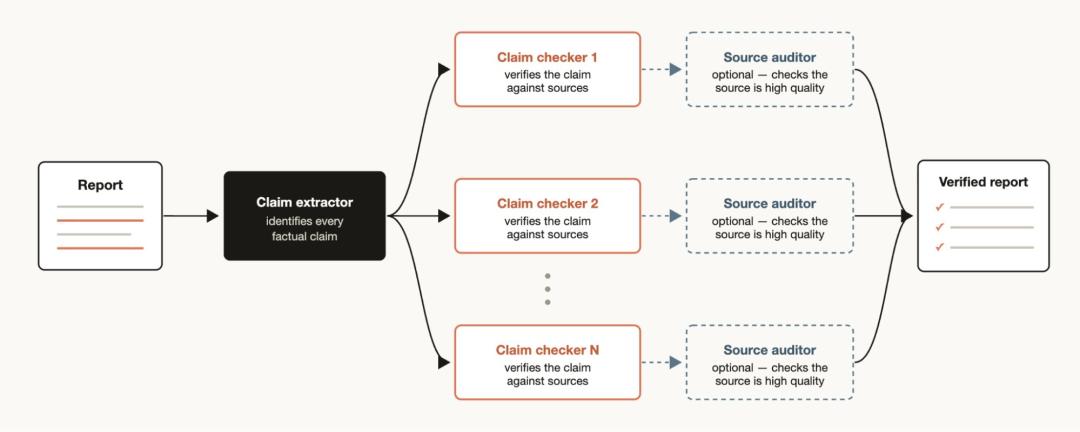
On the other hand, if you have a report and want to verify each factual statement and its source one by one, you can build a workflow: first, an Agent is responsible for identifying all factual statements, and then a sub - Agent is derived to conduct a detailed verification of each statement. In addition, you can introduce a verification Agent to review the sub - Agent responsible for tracing the source to ensure that the sources it quotes are of high quality.
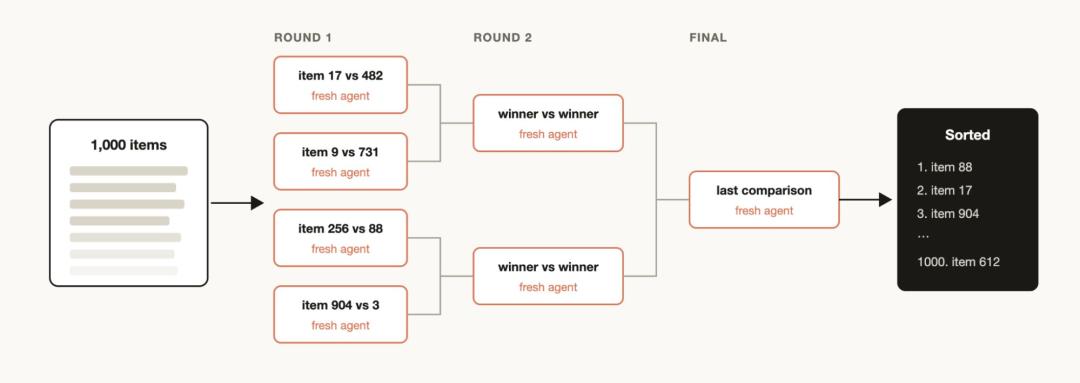
You may have a batch of items that you want to sort according to a certain qualitative standard, which Claude Code is good at judging. For example, sort support tickets by the severity of bugs.
However, if you try to process more than 1000 lines in a single prompt, the quality is likely to decline, and the context may not be able to hold all the information. A better approach is to run a “tournament”: build a pipeline composed of pairwise comparison Agents. Pairwise comparison is usually more reliable than directly giving absolute scores.
You can also perform parallel bucket sorting first and then merge the results. Each comparison is completed by an independent Agent, and a deterministic loop is responsible for maintaining the entire tournament bracket. Only the current execution order remains in the context.
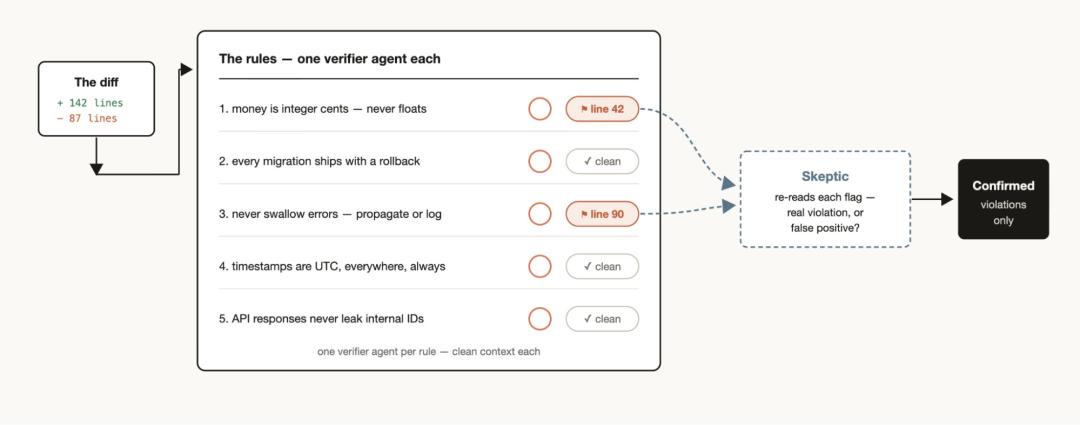
If you find that Claude often misses or fails to execute a set of rules even after writing them in CLAUDE.md, you can create a dedicated workflow: list these rules and let a verification Agent check them one by one. Each rule corresponds to a verification Agent.
At the same time, create a sub - Agent with a skeptical perspective to review whether these rules are reasonable and whether they are truly aligned with the goals, which can reduce false alarms.
The opposite is also true: you can extract the problems that you repeatedly correct from recent sessions and code review comments; then let multiple Agents classify and organize them in parallel; then conduct adversarial verification on each candidate rule, for example, ask: Could this rule really have avoided a real error at that time? Finally, refine the verified rules back into CLAUDE.md.
The most effective way to debug is usually to propose several independent hypotheses first and then verify them one by one. However, if relying on only one context window, Claude is likely to fall into a certain “self - preference”: the more it looks, the more it believes its initial judgment.
Workflows can avoid this structurally. It can allow multiple Agents to propose hypotheses based on isolated evidence. For example, one Agent only looks at logs, one only looks at files, and one only looks at data. Then, each hypothesis is examined by a group of verifiers and refuters.
This method is not only applicable to code. It can also be used in sales scenarios, such as analyzing why sales declined in March; and in data engineering, such as investigating why a certain data pipeline failed. Any problem that requires a review and root cause analysis can be handled using a similar workflow.
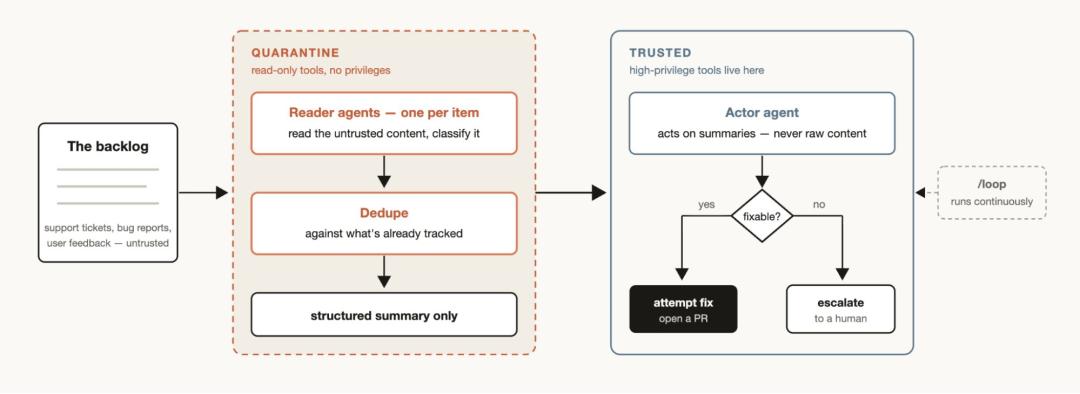
Every team faces support ticket queues, bug reports, or other backlog tasks that often cannot be fully handled manually. A triage workflow can classify each to - do item, compare it with the tracked items to remove duplicates, and take corresponding actions. These actions may include trying to fix the problem directly or escalating it to a human user for processing.
In the triage workflow, “quarantine” is a very useful pattern. The core approach is to prohibit Agents responsible for reading untrusted public content from performing high - privilege operations; instead, these high - privilege operations will be performed by Agents specifically responsible for taking actions based on information. Combining the triage workflow with the /loop command allows Claude to continuously and automatically execute such tasks.
Workflows are particularly useful when exploring different implementation paths for a solution, especially when the task involves subjective “taste” judgments (such as design or naming work) and needs to be evaluated based on a set of established criteria (Rubric).
Try asking Claude to explore and generate a series of potential solutions, then assign a “review Agent” and provide it with a clear set of evaluation criteria to define what a “good” solution is. When the review Agent determines that a solution fully meets the established criteria, the task is completed. In addition, solutions can be ranked or finally selected through a “tournament” - style competition mechanism based on this set of evaluation criteria.
You can run a lightweight evaluation process for a specific task: first, derive a group of Agents in an independent “worktree” to execute the task; then derive a group of “comparison Agents” to compare and score the specific output results generated by the previous Agents based on the established evaluation criteria. For example, you can use this mechanism to evaluate a Skill you created based on specific evaluation criteria and optimize it iteratively.
You can create a “classification Agent” specifically tuned for your task, which is responsible for deciding which base model to call to execute the task. This mechanism is particularly useful when your task involves a large number of tool calls. Through pre - analysis and research before formally executing the task, the classification Agent can accurately identify the most suitable base model for the current task.
For example, for the task of “explaining how the authentication module (Auth module) works”, the best choice of the base model is not fixed, but depends on the number of files in the authentication module and the overall structure of the entire codebase. At this time, the classification Agent can undertake the pre - analysis task and intelligently route the task to different base models such as Sonnet or Opus based on the judgment of the expected complexity of the task.
“Workflows” are a relatively new feature. Although in many application scenarios, they can bring significant results with less effort, not every task needs to rely on workflows; abusing workflows may lead to consuming far more Token resources than expected.
 智算多多
智算多多官方邮箱:service@zsdodo.com
公司地址:北京市丰台区南四环西路188号总部基地三区国联股份数字经济总部
京公网安备11010602202532号